
SQL Joins Explained with Real Examples 2026 (INNER, LEFT, RIGHT, FULL)
In this article, we will understand SQL JOINs using practical examples that developers commonly work with.SQL JOINs are one of the most important concepts in SQL Server and are widely used in real-world applications. As developers gain experience, writing SQL queries is not just about retrieving data — it is about combining data efficiently from multiple tables to support business requirements. Whether you are building enterprise applications, reporting dashboards, REST APIs, or ASP.NET systems, understanding INNER JOIN, LEFT JOIN, RIGHT JOIN, and FULL JOIN is essential for writing optimized and maintainable SQL queries. In this article, we will understand each JOIN type with practical examples and real-world scenarios commonly used by experienced developers.
Sample Tables
Let’s consider two tables.
Employee Table
| EmployeeID | EmployeeName | DepartmentID |
|---|---|---|
| 101 | Vishal | 1 |
| 102 | Amit | 2 |
| 103 | Rahul | 3 |
| 104 | Priya | NULL |
Department Table
| DepartmentID | DepartmentName |
|---|---|
| 1 | HR |
| 2 | IT |
| 4 | Finance |
1. INNER JOIN
INNER JOIN returns only matching records from both tables.
SQL Query:
SELECT
E.EmployeeID,
E.EmployeeName,
D.DepartmentName
FROM Employee E
INNER JOIN Department D
ON E.DepartmentID = D.DepartmentID;
Output:
| EmployeeID | EmployeeName | DepartmentName |
|---|---|---|
| 101 | Vishal | HR |
| 102 | Amit | IT |
Real Project Scenario
Suppose an HR application needs to display employee details along with department names.
Since department information exists in another table, INNER JOIN becomes the most common solution.
Key Point
INNER JOIN excludes unmatched records.
Rahul and Priya are missing because matching departments are not available.
2. LEFT JOIN
LEFT JOIN returns all records from the left table and matching records from the right table.
SELECT
E.EmployeeID,
E.EmployeeName,
D.DepartmentName
FROM Employee E
LEFT JOIN Department D
ON E.DepartmentID = D.DepartmentID;
Output:
| EmployeeID | EmployeeName | DepartmentName |
|---|---|---|
| 101 | Vishal | HR |
| 102 | Amit | IT |
| 103 | Rahul | NULL |
| 104 | Priya | NULL |
Real Project Scenario
Imagine an employee onboarding module.
Even if a department is not assigned yet, management still wants employee records visible.
LEFT JOIN solves this requirement.
Common Use Case
- Master-detail reporting
- User profile systems
- Audit reports
- Dashboard applications
3. RIGHT JOIN
RIGHT JOIN returns all rows from the right table and matching rows from the left table.
SELECT
E.EmployeeName,
D.DepartmentName
FROM Employee E
RIGHT JOIN Department D
ON E.DepartmentID = D.DepartmentID;
Output:
| EmployeeName | DepartmentName |
|---|---|
| Vishal | HR |
| Amit | IT |
| NULL | Finance |
Real Project Scenario
Suppose management wants to display all departments, including departments with no employees assigned.
RIGHT JOIN becomes useful.
Practical Observation
In enterprise projects, developers often prefer LEFT JOIN over RIGHT JOIN for readability.
Many teams avoid RIGHT JOIN entirely and rewrite the query using LEFT JOIN.
4. FULL JOIN
FULL JOIN returns:
- Matching rows
- Left unmatched rows
- Right unmatched rows
SELECT
E.EmployeeName,
D.DepartmentName
FROM Employee E
FULL OUTER JOIN Department D
ON E.DepartmentID = D.DepartmentID;
Output:
| EmployeeName | DepartmentName |
|---|---|
| Vishal | HR |
| Amit | IT |
| Rahul | NULL |
| Priya | NULL |
| NULL | Finance |
Real Project Scenario
Data reconciliation reports.
Suppose HR data exists in one system and department data exists in another.
FULL JOIN helps identify missing mappings.
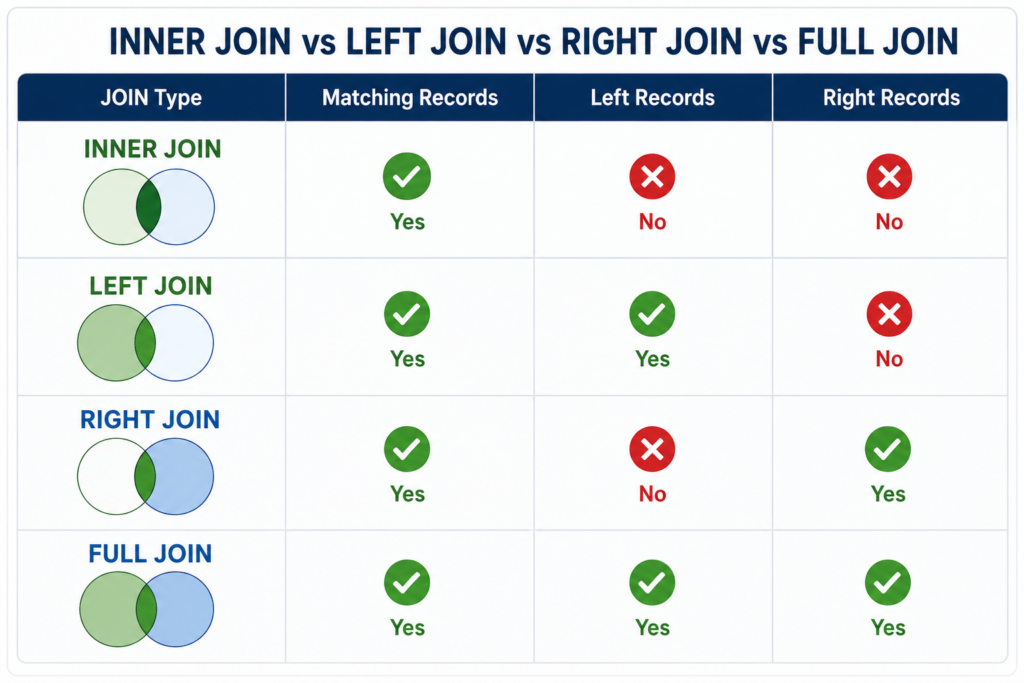
INNER JOIN vs LEFT JOIN vs RIGHT JOIN vs FULL JOIN
| JOIN Type | Matching Records | Left Records | Right Records |
|---|---|---|---|
| INNER JOIN | Yes | No | No |
| LEFT JOIN | Yes | Yes | No |
| RIGHT JOIN | Yes | No | Yes |
| FULL JOIN | Yes | Yes | Yes |
Performance Tips From Real Projects
1. Always index JOIN columns
Example:
CREATE INDEX IX_DepartmentID
ON Employee(DepartmentID);
Large tables without indexes can significantly slow JOIN performance.
2. Avoid SELECT *
Bad:
SELECT *
FROM Employee E
INNER JOIN Department D
ON E.DepartmentID=D.DepartmentID;
Good:
SELECT
E.EmployeeID,
E.EmployeeName,
D.DepartmentName
FROM Employee E
INNER JOIN Department D
ON E.DepartmentID=D.DepartmentID;
3. Check Execution Plan
For large enterprise applications, reviewing execution plans helps identify expensive JOIN operations.
SQL JOIN Interview Questions Experience)
Q1. Difference between INNER JOIN and LEFT JOIN?
INNER JOIN returns only matching records.
LEFT JOIN returns matching records plus unmatched records from the left table.
Q2. Why is RIGHT JOIN less common in enterprise projects?
LEFT JOIN provides better readability and standardization.
Q3. Which JOIN is useful for reconciliation reports?
FULL OUTER JOIN.
Q4. How do indexes improve JOIN performance?
Indexes reduce scan operations and improve lookup efficiency.
Final Thoughts
JOIN operations are foundational in SQL development. Whether building ASP.NET applications, REST APIs, reporting systems, or enterprise dashboards, understanding JOIN behavior directly impacts performance and maintainability.
For experienced developers, writing JOIN queries is not only about fetching data — it is about writing efficient, scalable SQL that performs well in production environments.